Lacefall
How to photograph a lace doily so it looks flat and clean
Lace is hard to photograph. It is white, full of holes and rarely lies flat, and a phone camera tends to wash it out or bend it into a trapezium. A few simple choices fix most of that, and you don’t need any special equipment.
Prepare the cloth
Most of a good lace photo happens before you pick up the phone.
- Clean and dry. Old lace often has yellowed spots. They show more clearly on camera than in the hand.
- Flat. Press it gently if it is creased, following whatever care advice suits the fabric. Folds cast shadows that read as dirt in a photo.
- Square. Pull the edges straight so the cloth sits in its true shape. A round doily should look round, not oval.
Choose a dark, plain background
White lace needs contrast. Lay it on something dark and even: a black or navy cloth, a dark wooden table without a strong grain, a sheet of black card. The holes then show as dark shapes and the thread as white, which is exactly what makes lace look like lace.
Avoid patterned surfaces. A busy tablecloth shows through every hole and the pattern of the lace disappears into it.

Light it softly
- Daylight from a window is the best light most of us have. Put the table near it, out of direct sun.
- Turn the flash off. Flash flattens the texture and makes white thread glare.
- Watch your own shadow. Standing over the cloth can block the light. Move until the whole cloth is evenly lit.
Shoot from directly above
This is the step that matters most. Hold the phone level, parallel to the table, with the cloth in the centre of the frame. Stand on a sturdy step if you need height; don’t tilt the phone to fit the cloth in, because tilting turns a square into a trapezium.
- Fill the frame. Get close enough that the cloth takes up most of the picture, with a thin margin of background all round.
- Keep the whole cloth in. Cropped edges can’t be added back later.
- Take several. Shoot a few frames and keep the sharpest one.
When the photo doesn’t look right
- It’s blurry. Tap the screen on the lace to focus there, rest your elbows on something, and hold still as you press the shutter.
- The lace looks yellow or blue. Mixed light is usually the cause. Turn off the ceiling lamp and use only the window.
- The white has no detail. The picture is too bright. On most phones you can tap to focus and then slide the brightness down a little.
- Cream or coloured lace. Cream still works on dark. For a dark lace, pick a light, plain background instead; contrast is what counts.
Bring it to your Mac
If you took the photo on an iPhone, AirDrop is the quickest way across. Turn AirDrop on, choose your Mac as the recipient, and accept it on the Mac. Apple notes that some items are saved straight into the Downloads folder, and that items sent between devices with the same Apple Account are accepted automatically.
Small fixes afterwards
If the photo is slightly crooked, the Photos app can help. Open the photo, click Edit, then Crop. You can drag the selection rectangle to trim the edges and use the Straighten, Vertical and Horizontal sliders to correct the angle. Click Done to keep the changes, or Reset to start over.
Resist heavy filters. They change the colour of the thread and hide the stitches you wanted to show.
How Lacefall helps
In Lacefall you can hang your own lace on the screen. In the Lace tab, choose Add your own, then pick a photo. Lacefall looks for the cloth in it and shows the Fit your lace window.
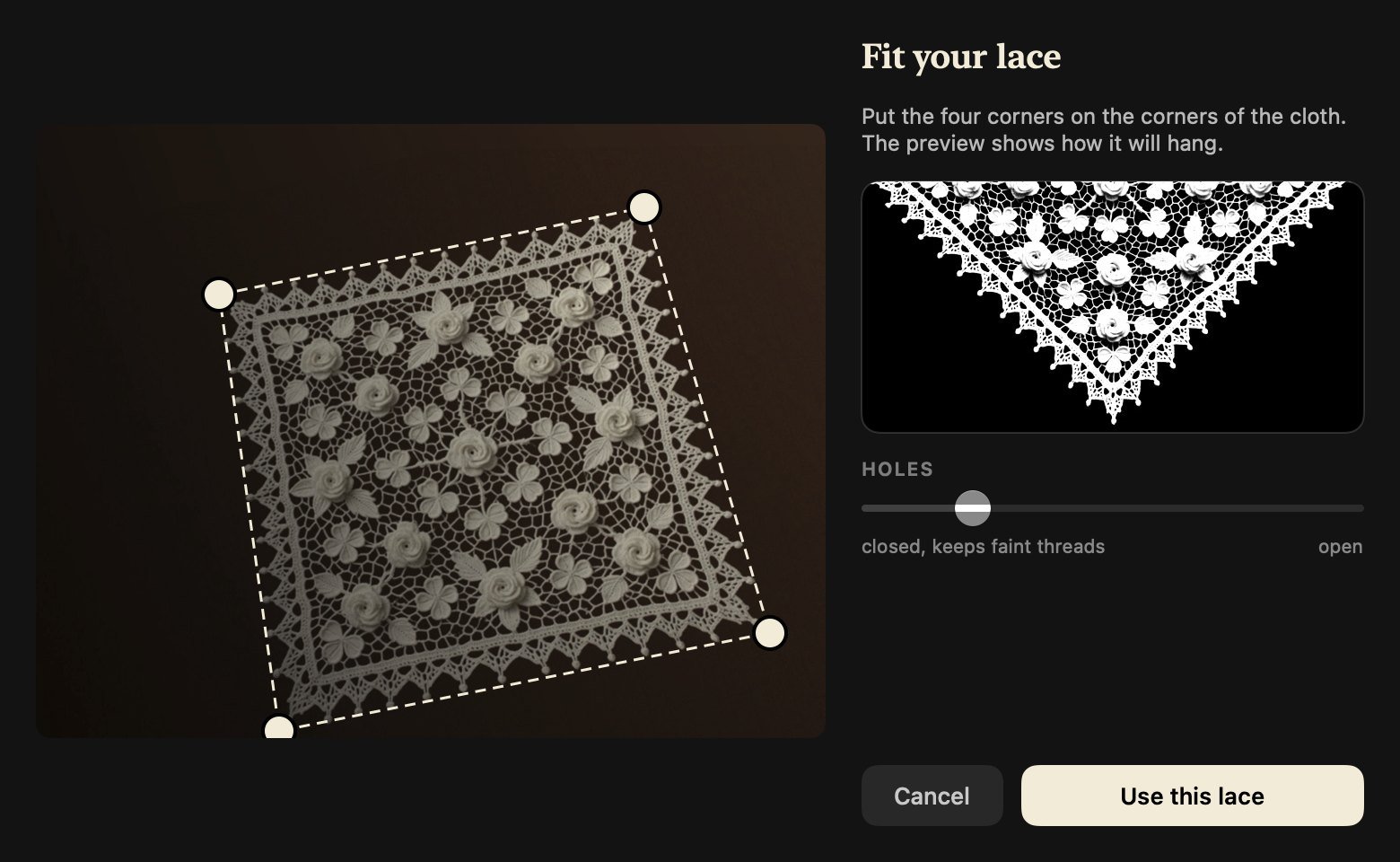
- Drag the four corners onto the corners of the cloth. The preview shows how it will hang.
- Use the Holes slider to go from closed, where faint threads stay, to fully open.
- Click Use this lace.
If Lacefall can’t find the cloth, it asks you to lay it flat on a dark, plain surface, fill the frame and photograph it from directly above: the same advice as this guide. The photo is processed on your Mac and kept there; it is never uploaded. Your own lace is part of the full version, and the trial includes it for a month.